
Data Manager: Upload Asset Data
Upload, tier, edit, and export your data.
Guided Demo
To analyze an existing portfolio of assets, please upload your asset data via the Data Manager. Watch the guided demo below to get started.
Important Note: Tiering your data (via the Data Upload Template)
When uploading your properties, you are required to create your first tier. Tiering is essential for building parent/child hierarchies within your dataset. These hierarchies capture nuances like internal/ external reference data surrounding fund/ portfolio composition, including, but not limited to:
Firm,
Fund,
Strategy
Manager/Operator,
Portfolio/Investment/Pool/Deal,
Capital Contribution,
Etc.

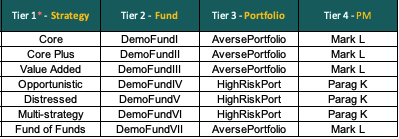
Tip: Swap "INSERT TIER 1 NAME (ex. Strategy)," etc., for your desired nomenclature - this will reflect in the UI & subsequent exports!
Note: Each Tier 1, 2, and 3 has its own child tiers, and while the names could be the same, parent tiers are always unique.
Caution: Deleting a tier will remove the associated underlying data since the tier serves as a grouping mechanism. Alternatively, to retain the underlying data, update the current tier to another, and then proceed with the deletion of the now-empty, i.e., former parent tier.
Last updated
Was this helpful?